New ยท MaYa Email Campaigns

Bring customers back, in your own brand.

MaYa emails the customers your push notifications can't reach. Every email looks like your restaurant, opens the exact dish for delivery or pickup, and carries a real one-click unsubscribe. MaYa proposes, you approve, and nothing goes out without you.

Already on MyShop? Turn it on from Marketplace in your admin. It's off until you do.

1,000
Emails free every 30 days
3
Templates, MaYa picks
8
Languages
1 click
To unsubscribe
A sample campaign email from a restaurant called Luna Trattoria: the customer's usual Margherita at 20% off, with separate Order for delivery and Order for pickup buttons and a coupon code.
Unsubscribe honored instantly
MaYa ยท Approvals
Ready for your OK

64 customers haven't ordered in 30+ days. Send them your Margherita at 20% off?

Push 12Email 52
Approve & sendEdit

Illustration with a sample brand. Each restaurant's emails use its own logo, colors and dishes.

How it works

From "they stopped coming" to "they're back"

Three steps, and you stay in control of every one.

Turn it on in Marketplace

It's off by default. In your MyShop admin, open Marketplace, choose MaYa Email Campaigns and tap Activate. Your existing unsubscribes are imported first, and your business name becomes the sender.

โ†’

MaYa proposes, you approve

MaYa prepares a ready campaign: who gets it, what the offer is, when it goes out, and push or email for each customer. You see the email exactly as your customers will, then approve it in MaYa's Approvals center or in the MaYa app.

โ†’

Customers order, you see it

One tap opens the dish for delivery or pickup. Orders arrive tagged "Email Marketing by MaYa", and every campaign shows the orders and revenue it brought back.

See how it looks for you

Three beautiful templates. MaYa picks the right one.

Every email carries your logo, your colors and your real dishes. MaYa chooses the template that fits each campaign, and you see her choice on the approval card.
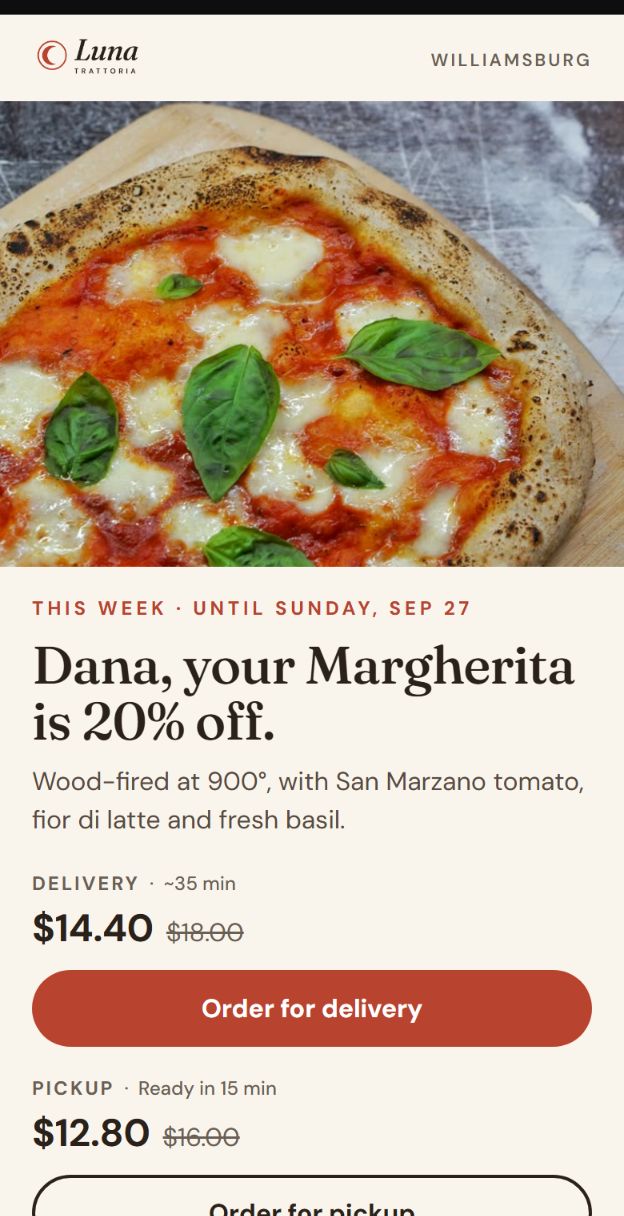
Template A, Signature Dish: one large photo of a Margherita pizza with delivery and pickup prices.
A Signature Dish

One dish, big and beautiful. For a new, seasonal or signature item when you have a great photo of it.

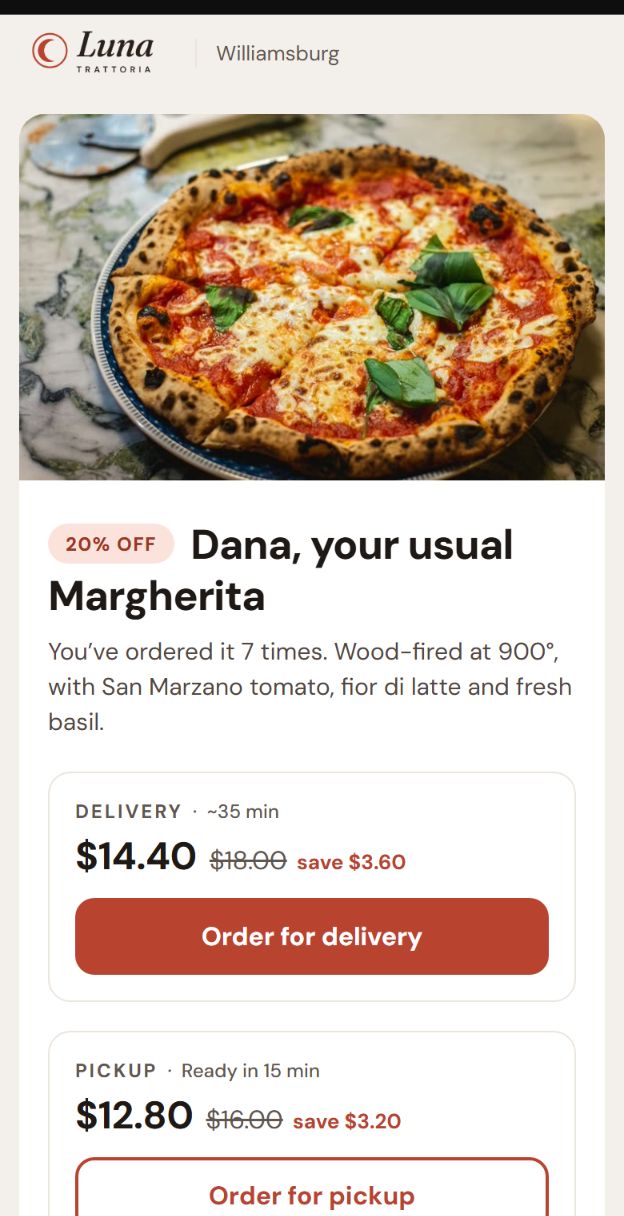
Template B, Quick Order: the customer's usual Margherita at 20% off, with delivery and pickup cards and order buttons.
B Quick Order Default

Like a card in a delivery app: a deal on the customer's usual dish, or 3 to 6 dishes from your menu. Made for delivery, quick service and regulars.

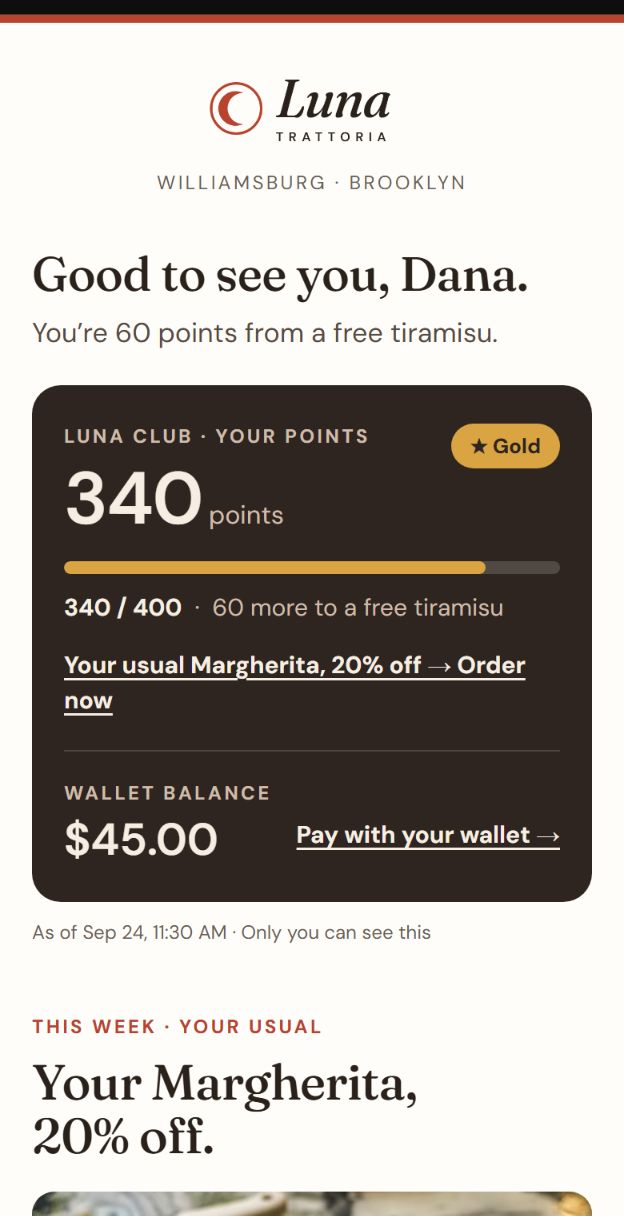
Template C, Member Card: the customer's loyalty points, Gold tier and wallet balance, followed by the offer.
C Member Card

Opens like a membership card: points, tier, wallet balance and how close the next reward is. Then the offer.

"See how it looks for you", before you turn anything on

From the Marketplace card, open all three templates designed for your own business: your logo, colors, name and address, and 2 to 3 real dishes from your menu with photo and price. Send the samples to your own inbox. It needs no activation, doesn't count toward your emails, and never reaches a customer.

DesktopPhoneLightDarkYour languages

Shown with a sample brand, Luna Trattoria.

What's inside

Smart where it counts, respectful everywhere

๐ŸŽฏ

The right channel for each customer

Push if they have your app, email if they don't. A customer never gets the same campaign twice.

๐ŸŽจ

Looks like your restaurant

The logo, color and photos of each location, written in your business's languages, and designed to look right on a phone, a desktop and in dark mode.

๐Ÿ”—

One tap to the exact dish

The button opens the item on your ordering site, for delivery or pickup. Sold out? It lands on the category with a gentle note. Closed right now? It shows when you open.

๐ŸŽŸ๏ธ

Coupon codes that are easy to use

The code is shown large, with a Copy code button where the mail app allows it, and the customer types it at checkout.

โญ

Personal club & wallet block

If you run a loyalty club or wallet, each customer sees their own points and tier, wallet balance, or an unused welcome gift, with a button to redeem.

๐Ÿ“ˆ

Results in real orders

Orders from your campaigns are tagged "Email Marketing by MaYa" in your orders list and reports. Each campaign shows what it sent and what came back.

Unsubscribe & anti-spam, built in

Your customers stay happy to hear from you.

MaYa writes only to your own customers, the people who already receive your order confirmations by email. Every campaign email says it's an advertisement from your business, shows your physical address, and makes leaving easy.

  • One-click unsubscribe in the mail app's header and in every email. Replies like "stop" count too.
  • Honored instantly and kept forever, even if you pause the service or leave MyShop.
  • At most one campaign email per customer every 72 hours, sent between 9 AM and 8 PM, location time.
  • Your order confirmations, receipts and sign-in codes keep going exactly as today. Only campaign emails are ever paused or counted.

One-click unsubscribe

Instant and forever, no login and no questions.

Frequency caps

Quiet hours and a per-customer limit, so no one is flooded.

Auto-pause

Sending stops on its own if complaints show up.

No list uploads

Only your real customers, never a bought or imported list.

Margherita week ยท 20% off
Campaign results ยท SEO & Marketing โ€บ Email campaigns
Sent
412
Clicked
58
Orders
14
Revenue
$402
#10482 Dana R. ยท Margherita ร—2 Email Marketing by MaYa
#10477 Omar K. ยท Carbonara Email Marketing by MaYa

Illustration with a sample restaurant. Numbers are examples, not customer results.

Proof, not opens

See exactly what each email brought back.

An order counts for a campaign when the customer used its coupon, clicked its link, or received it in the days before ordering. It's tagged the moment it's created, and it's removed from the tally if the order is cancelled.

  • Per campaign: sent, clicked, orders and revenue.
  • A small holdout group (5%) doesn't receive the campaign, so you can compare honestly.
  • New order channels in your orders list, reports and MaYa Wins: "Email Marketing by MaYa" and "Push Marketing by MaYa".
Pricing

Start free. Grow when you need to.

Every plan includes every feature. The only difference is how many campaign emails you can send in each 30-day cycle.

Free
$0 / 30 days
1,000 campaign emails
  • Every feature included
  • New cycle every 30 days from activation
  • Upgrade any time
More reach
Plus
$40 / 30 days
10,000 campaign emails
  • Every feature included
  • +10,000 one-time add-on when you need it
  • No commitment, cancel any time
Pro
$90 / 30 days
30,000 campaign emails
  • Same features, 3ร— the emails
  • +10,000 one-time add-on when you need it
  • No commitment, cancel any time

Ran out mid-cycle on Plus or Pro? Add a one-time +10,000 emails for $40, valid to the end of the current 30-day cycle, up to 3 times per cycle, and only when you approve it. No unlimited plan and no automatic overage charges. Paid plans renew every 30 days from the day you order and are billed by MyShop by card. Cancel any time: your plan runs to the end of the current cycle, then returns to Free. Each location has its own plan and cycle. Activation needs at least 50 customers with an email you can reach.

Questions

Good to know

Does MaYa send emails on her own?
No. MaYa proposes each campaign and you approve it in MaYa's Approvals center in your admin, or in the MaYa app. While the service is off, no campaign email goes out at all.
Who receives the emails?
Only your own customers who ordered and received an order confirmation by email, and who haven't unsubscribed. Every email identifies itself as an advertisement from your business, includes your physical address, and has a one-click unsubscribe that works instantly.
Is it an extra cost?
Free includes 1,000 campaign emails every 30 days with every feature. Plus ($40) and Pro ($90) are optional, for more emails. Order confirmations, receipts and sign-in codes never count toward your emails, and nothing is ever charged automatically.
What if I run out of emails mid-cycle?
On Plus or Pro you can add a one-time +10,000 emails for $40, until the end of the current 30-day cycle, only with your approval. On Free, you can upgrade to Plus or Pro. When emails run out, campaign emails simply wait for your decision.
What does the button in the email open?
With an active MyShop ordering site, it opens the exact dish for delivery or pickup. For a business that takes orders by phone, app or in store, the button leads there instead: call, download the app, or visit the location.
Can I cancel?
Any time, with no commitment. A paid plan stays active to the end of the current 30-day cycle and then returns to Free. You can also pause sending with one switch and resume whenever you like.
I run several locations. How does it work?
Each location has its own plan, 30-day cycle and emails, and its own branding. The network admin turns it on and pays per location, with one payment method.

Your regulars are one email away.

Already on MyShop? Open Marketplace in your admin and try "See how it looks for you". New to MyShop? Book a demo and we'll show you your own emails.

Free ยท 1,000 emails every 30 days